

If your eyes feel tired by noon and you keep repositioning your desk lamp trying to fix it, the lamp is not the solution. It is the problem. A traditional desk lamp throws light from the side or from above at an angle that bounces straight off your monitor and into your eyes. A monitor light bar sits on top of your screen and aims light downward onto your desk, keeping your screen completely glare-free. The BenQ ScreenBar is the one that put this category on the map, and after two years of daily use it is still the best version of the idea. Here are 10 concrete reasons a monitor light bar beats a desk lamp for anyone working from home.
Your desk lamp is making your eyes work harder than they have to.
The BenQ ScreenBar mounts on your monitor in 30 seconds, draws power from a USB port, and puts the light exactly where you need it. Rated 4.7 stars across more than 5,000 reviews.
Amazon Check Today's Price on Amazon →It eliminates screen glare completely
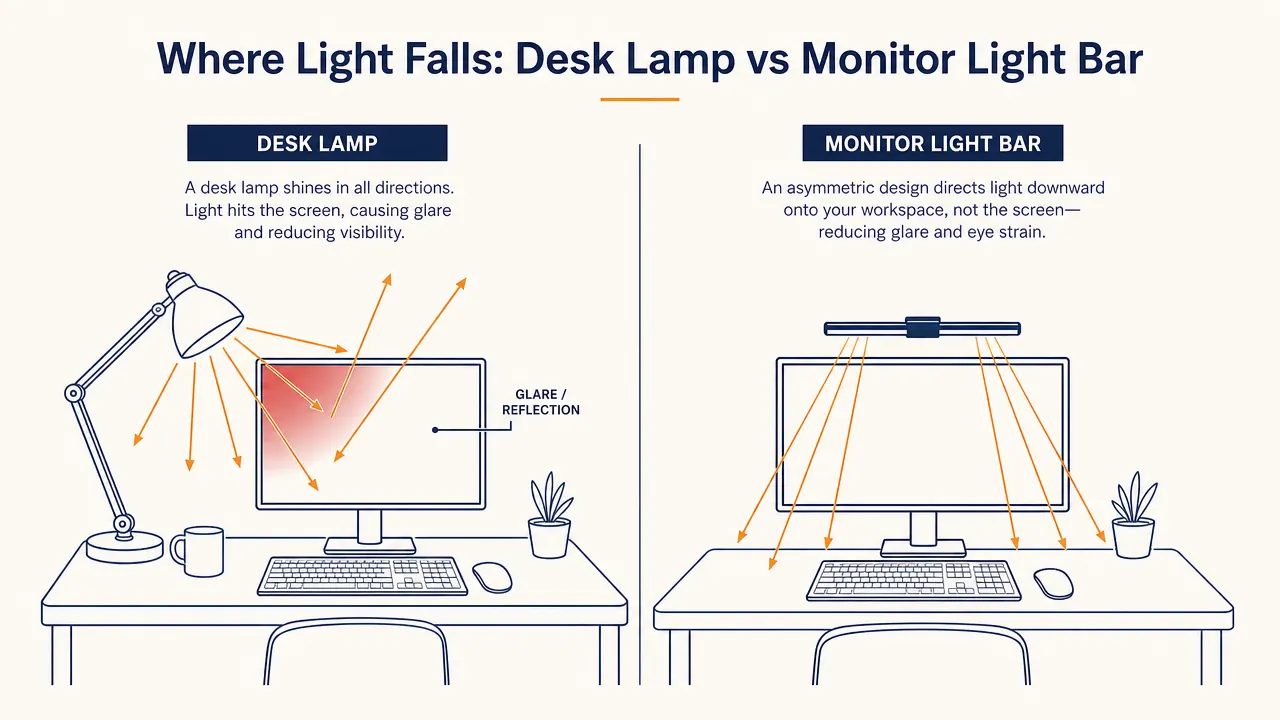
A desk lamp positioned to the side or behind you sends light at an angle that reflects off your monitor. You end up squinting at a bright hotspot in the corner of your screen all day. The ScreenBar's asymmetric optical design directs light forward and downward only. None of it hits the monitor surface. The effect is immediate and obvious the first time you turn it on.

It clips onto your monitor and takes zero desk space
The average desk lamp base is about 6 inches in diameter. That is real estate on a desk that is usually already crowded with a keyboard, mouse, notebook, and coffee mug. The ScreenBar clips onto the top bezel of your monitor and hangs there. Your desk surface stays clear. If you are running a small or tight setup, this alone is worth the switch.
Auto-dimming matches the light to your room
The ScreenBar has a built-in ambient light sensor. When natural light fills your room in the morning, it dims automatically. When the sun goes down and your room darkens, it brightens. You do not notice you are being served perfectly calibrated light. You just notice your eyes feel fine at 4pm instead of burned out. Most desk lamps are stuck at whatever brightness you set them to.
Color temperature is adjustable from warm to cool
The ScreenBar goes from 2700K warm amber light to 6500K daylight white. In the morning when you want to feel alert, you run it cooler. In the evening when you want your body to wind down, you warm it up. A standard desk lamp gives you one color temperature and that is it. The difference matters more than you think, especially on long work days.
It powers from a USB port, no outlet required
Plug it into any USB-A port on your monitor, computer, or hub and it turns on. No power brick, no hunting for a free outlet, no extension cord snaking across the desk. If you are already running a docking station or a USB hub, you have power available. This matters more than it sounds when you are trying to keep cable clutter under control. For tips on hub setups that support this kind of clean workflow, see our <a href="/selore-usb-c-docking-station-review-long-term">Selore docking station review</a>.
It reduces eye strain during long focus sessions
Eye strain from a home office setup is almost always a lighting problem, not a vision problem. Inconsistent brightness, contrast between a bright screen and a dark surround, or glare all force your pupils to constantly readjust. The ScreenBar keeps your screen surround lit at a consistent level that matches the brightness of the screen itself. The result is less pupil fatigue across a full workday. We cover the full science and setup in our guide on <a href="/how-to-reduce-eye-strain-monitor-light-bar">how to reduce eye strain using a monitor light bar</a>.
It works on curved monitors where lamps really struggle
If you have a curved ultrawide monitor, you know the challenge. No matter where you position a desk lamp, part of the curved surface catches it and throws a reflection. The ScreenBar sits on the top of the monitor and its adjustable tilt lets you angle the light forward enough to clear the curve. It solves a problem that standard lamps cannot solve regardless of where you put them.
The first thing I noticed was not the light quality. It was that I stopped noticing the light at all. That is how eye-strain-free it is.
The touch controls are fast and precise
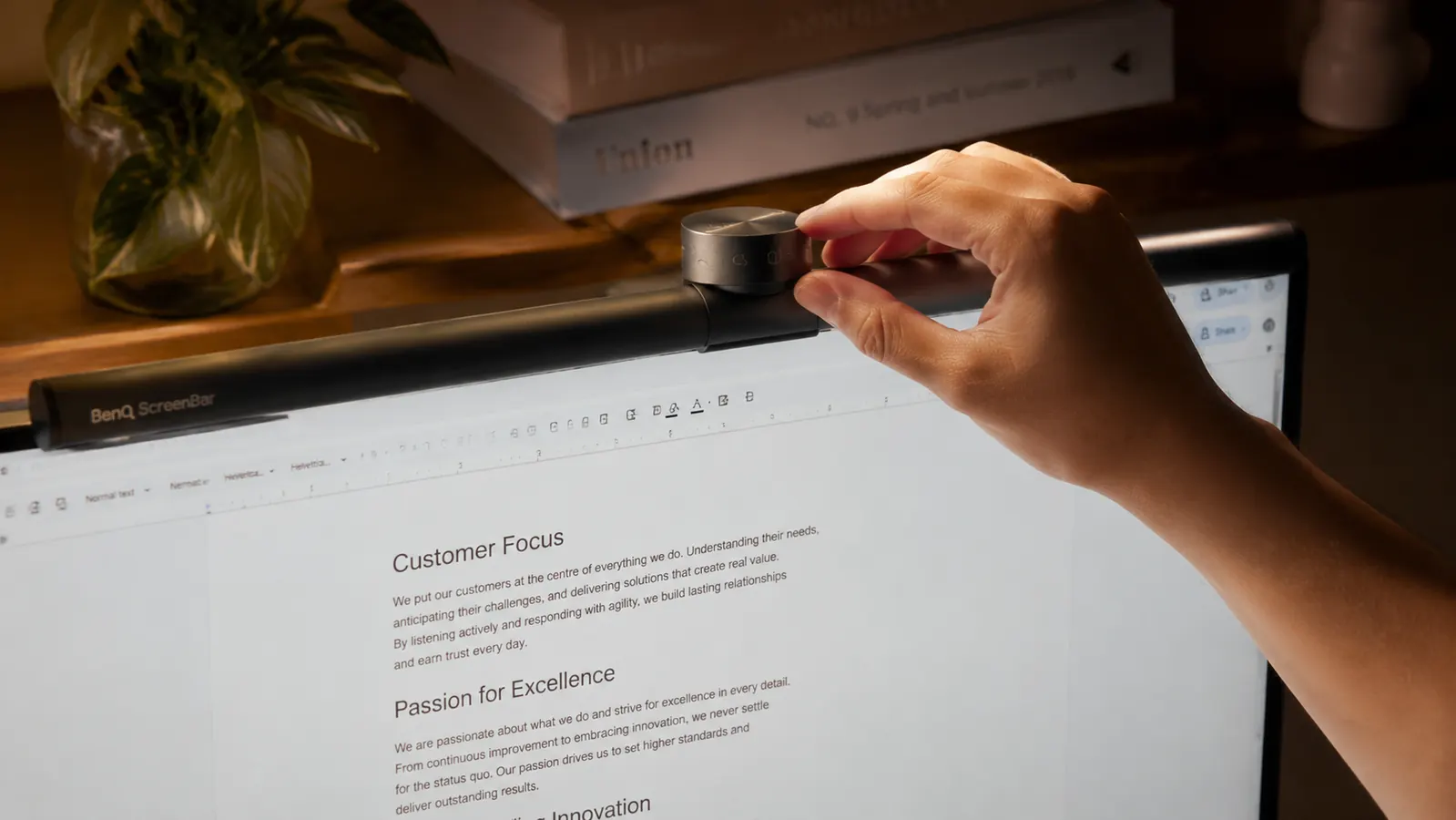
On the right end of the ScreenBar is a small touch-sensitive dial. Slide your finger to adjust brightness. Tap to toggle auto-dimming on or off. A single button cycles through color temperatures. No app, no remote, no voice command required. You just reach up and adjust it in two seconds without breaking your focus. Desk lamps usually have a rotary knob at the base that you have to reach over your keyboard to get to.
It is purpose-built for screens, not general room lighting
A desk lamp was designed to light a desk in any context, reading, writing, crafting. A monitor light bar was designed specifically for one scenario: a person working on a screen in a home office. The beam angle, the asymmetric optics, the color temperature range, the brightness ceiling. All of it was engineered for this exact use case. When you use a tool built for the right job, it shows. For a full breakdown of how the ScreenBar compares to cheaper alternatives, read our <a href="/benq-screenbar-vs-quntis-monitor-lamp">BenQ ScreenBar vs Quntis comparison</a>.
It looks like a professional setup instead of a student desk
This sounds superficial but it matters if you are on video calls. A desk lamp in frame looks like a bedroom setup. A clean monitor with a slim light bar on top looks like someone who takes their workspace seriously. If you are working with clients, appearing on internal video calls, or just want to feel more focused in your own space, the visual upgrade is real. We cover the full two-year experience in our <a href="/benq-screenbar-review-long-term">long-term BenQ ScreenBar review</a>.
What I Would Skip
The ScreenBar Plus adds a wireless remote puck on your desk so you do not have to reach up to adjust settings. It costs about $40 more. Honest take: the touch controls on the standard ScreenBar are good enough that the remote feels like a luxury, not a necessity. If you already have a crowded desk, you do not need another object on it. The base ScreenBar is the right buy for most home office setups.
Ten reasons, one switch. The BenQ ScreenBar is the single fastest upgrade you can make to a home office.
USB-powered, no glare, auto-dimming, 4.7 stars from 5,375 buyers. Mounts in 30 seconds. Your eyes will notice the difference before the first hour is up.
Amazon Check Today's Price on Amazon →